Attribution
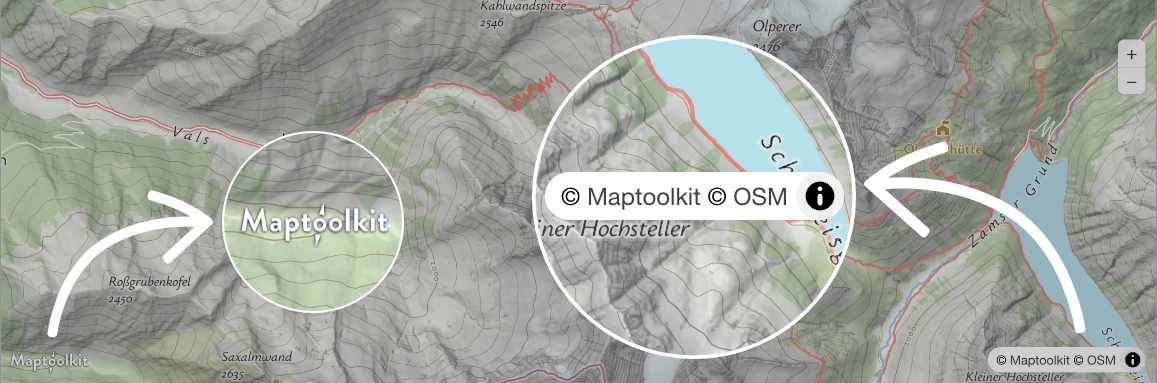
Every map built on the Community Tile Server must show two elements: the Maptoolkit logo and the © Maptoolkit © Openstreetmap copyright line. This page covers how to produce them in each supported library and how to verify they stay visible. The binding wording is Section 8 of the Community License Terms of Use.
What Has to Be on the Map
Maptoolkit logo
- Minimum height 24 px on web, 24 pt/dp on mobile, including high-density (Retina) displays.
- Links to https://www.maptoolkit.org/.
- Place it wherever suits your layout.
Copyright line
- Text:
© Maptoolkit © Openstreetmap, in the bottom-right corner. Maptoolkitlinks to https://www.maptoolkit.com/copyright/,Openstreetmapto https://www.openstreetmap.org/copyright.
Neither element may be hidden, obscured, collapsed away or removed at any screen size, orientation or zoom level. Your own controls and overlays must not cover them.
The copyright line comes from the service itself: the mtk TileJSON carries the exact string with both links, so most renderers display it without you writing it. The logo is a separate element that you place.
Logo Asset and Helper Packages
On MapLibre GL JS and Leaflet, a drop-in package places the logo and handles its sizing, positioning and link. Both are MIT licensed with public source. On every other platform, place the logo asset yourself.

Source for both packages: github.com/maptoolkit/attribution-plugins.
MapLibre GL JS
The built-in AttributionControl renders the copyright line from the style. Do not hand-write it. You do have to configure it, because the control’s default is compact mode.
In compact mode the line renders expanded, then collapses to a small information button the first time someone drags the map. A collapsed line does not satisfy the requirement, so construct the map with compact: false:
import { MaptoolkitLogoControl } from '@maptoolkit/maplibre-gl-logo';

const map = new maplibregl.Map({
  container: 'map',
  style: 'https://styles.maptoolkit.org/summer.json',
  attributionControl: { customAttribution: '', compact: false }
});

map.addControl(new MaptoolkitLogoControl());attributionControl option object replaces MapLibre’s defaults, it is not merged with them. If you pass any options of your own without compact, the setting falls back to viewport-dependent behavior rather than to the documented default. Always set compact: false explicitly.The three cases:
attributionControl value | Behavior |
|---|---|
| Omitted entirely | Compact at every width, collapses on first drag |
An object without compact | Expanded above 640 px, compact and collapsing at 640 px and below |
An object with compact: false | Stays expanded at every width |
Reopening the control from JavaScript does not work. In compact mode the text is shown and hidden by the maplibregl-compact-show class rather than by the open attribute, so setting open has no effect and the next drag collapses it again.
If a wrapper library owns the MapLibre instance and does not expose attributionControl, render the copyright span from the overlay instead.
Leaflet
Add the logo with @maptoolkit/leaflet-logo. The copyright line is passed as the layer’s attribution option, as a string you write once:
import { MaptoolkitLogoControl } from '@maptoolkit/leaflet-logo';

L.maplibreGL({
  style: 'https://styles.maptoolkit.org/summer.json',
  attribution:
    "<a href='https://www.maptoolkit.com/copyright/' target='_blank' rel='noopener'>© Maptoolkit</a> " +
    "<a href='https://www.openstreetmap.org/copyright' target='_blank' rel='noopener'>© Openstreetmap</a>"
}).addTo(map);

new MaptoolkitLogoControl().addTo(map);
Renderers Without an Attribution Control
deck.gl and CesiumJS consume raw tiles and display nothing automatically. OpenLayers and kepler.gl render from the style and may surface the line through their own attribution control; kepler.gl’s collapses.
Use the overlay below for both elements. Drop its .mtk-copy span only where you have confirmed the renderer’s own line is permanently visible and never collapses. The map container needs position: relative.
<style>
  .mtk-logo{position:absolute;left:8px;bottom:8px;z-index:1000}
  .mtk-logo img{height:24px;display:block}
  .mtk-copy{position:absolute;right:0;bottom:0;z-index:1000;
    background:rgba(255,255,255,.7);padding:0 5px;font:12px/1.5 sans-serif}
  .mtk-copy a{color:#000;text-decoration:none}
</style>
<a class="mtk-logo" href="https://www.maptoolkit.org/" target="_blank" rel="noopener">
  <img src="https://www.maptoolkit.org/assets/maptoolkit-attribution.png" alt="Maptoolkit">
</a>
<span class="mtk-copy">
  <a href="https://www.maptoolkit.com/copyright/" target="_blank" rel="noopener">© Maptoolkit</a>
  <a href="https://www.openstreetmap.org/copyright" target="_blank" rel="noopener">© Openstreetmap</a>
</span>
Mobile SDKs
This covers MapLibre Native iOS, MapLibre Native Android, Flutter and React Native.
The native SDKs display the copyright line through their built-in attribution button, which reads it from the mtk TileJSON. Leave that button enabled and do not cover it.
There is no logo package for native platforms. Place the logo asset as a fixed overlay on the map view, at a minimum of 24 pt (iOS), 24 dp (Android) or 24 logical pixels (Flutter, React Native), and make it open https://www.maptoolkit.org/ when tapped. Supply a high-density asset so the logo is not upscaled on Retina and xxhdpi screens.
Verify Your Attribution
Both elements have to hold up under interaction, not just on first paint. Check each of these on a live map:
- Drag the map. The copyright line must not collapse into an information button. This is the most common failure.
- Resize the window to 400 px wide, or open the page on a phone. Both elements must still be present and legible.
- Rotate to landscape on a mobile device.
- Zoom in and out. Neither element may disappear at any zoom level.
- Check your own UI. Custom controls, legends, popups and fullscreen overlays must not sit on top of either element.
- Measure the logo. It must be at least 24 px/pt/dp high in its rendered state, not just in the source asset.